


This system is used in Austria, Belgium, Cyprus, Estonia, Finland, France, Italy, Latvia, Luxembourg, Malta, the Netherlands, Norway, Poland, Portugal, Romania, Slovenia, Spain, Hungary and the United Kingdom (Northern Ireland).
The login details required for this step must be obtained from the relevant NMVS. First, enter all the data received into the relevant text fields, and then enter the username and initial password received from the NMVS in the ‘Certificate’ section.
The certificate is then downloaded. First, open the certificate window by clicking the ‘plus’ icon.
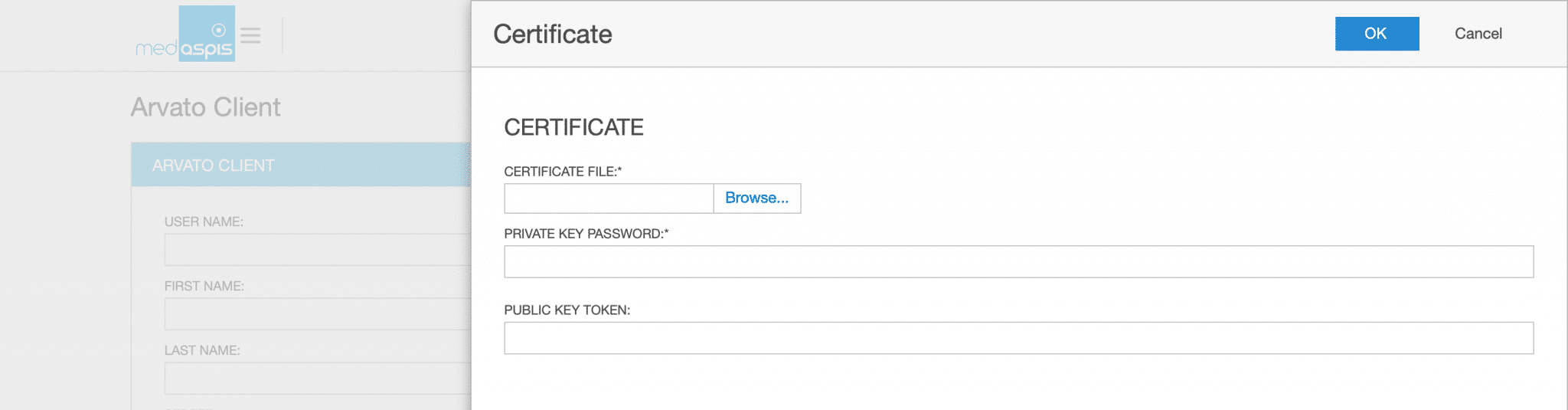
The certificate file previously provided by the NMVO (p.12) is uploaded, and the certificate password and password token are entered. Both pieces of information are provided by the NMVS. The certificate window is closed by clicking ‘OK’, and the entire process is completed by clicking ‘Save’.
You will then be asked to accept Arvato’s ‘Terms and Conditions’ in the Arvato main window, and your initial password will be changed. Buttons for both of these actions are available at the top of the window.
Confirm the new password by clicking OK. The password window closes.
The process is completed, the system is connected to the responsible NMVS.
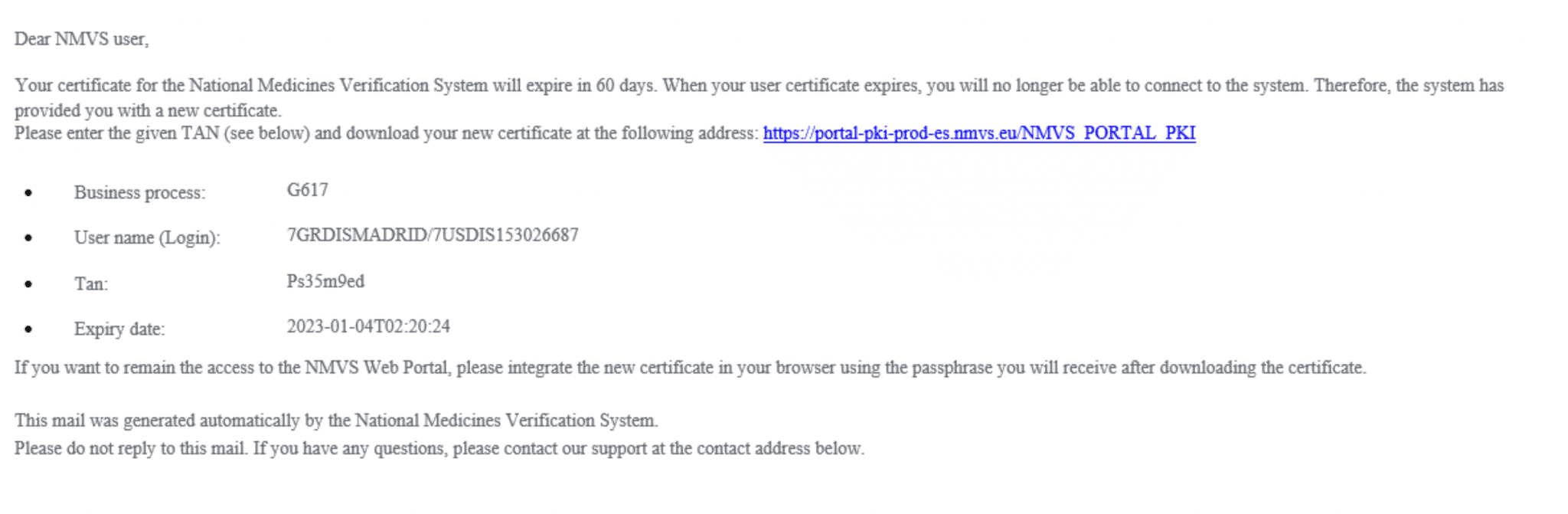
From time to time, access certificates need to be renewed. You must request a new certificate from your NMVO. In the example given here, this is SEVeM, the Spanish NMVO. In this case, the response will consist of a username, a TAN code and a URL.
From now on, the process continues in the medAspis Control Panel. Please go to the ‘Account’ tab in the menu. Ensure that the fields under ‘Certificate’ are filled in with your valid Client ID and Client Secret (your NMVS login details). Please click on ‘Update Certificate’.
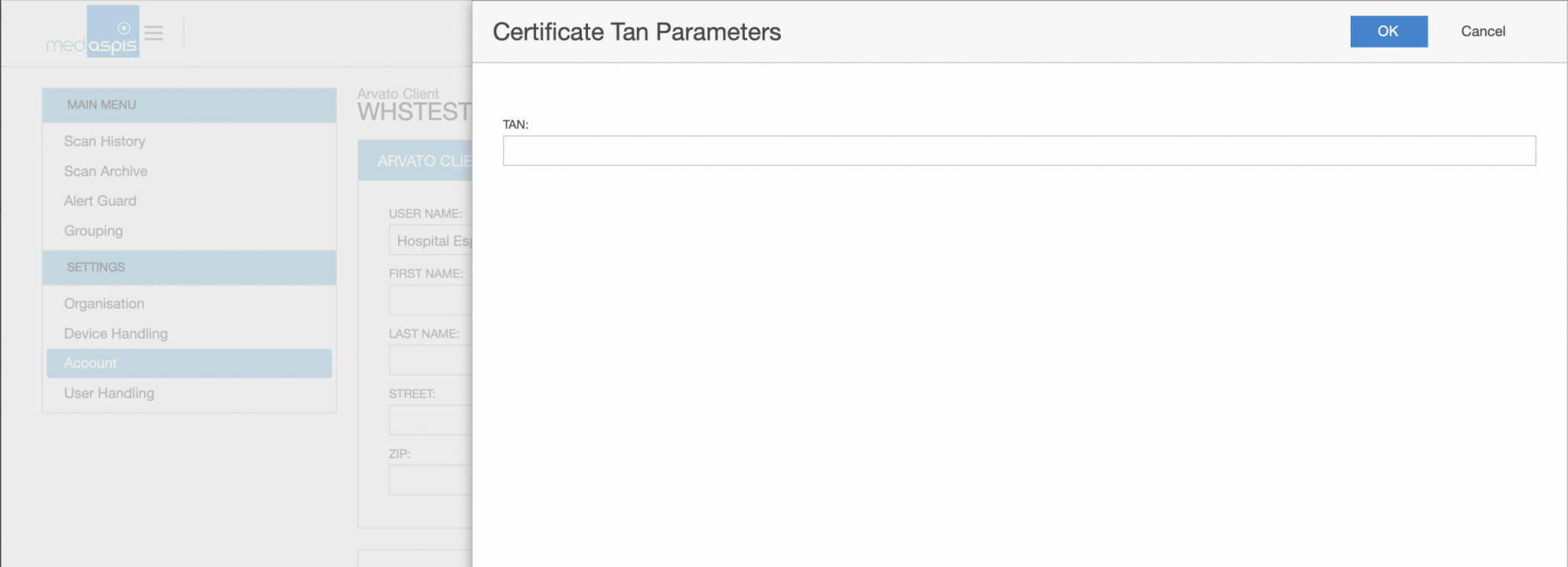
In the next window, enter the TAN you received earlier and click ‘OK’.
Bitte vergessen Sie nicht, den Vorgang durch Klicken auf die Schaltfläche „SAVE“ oben auf dem Bildschirm abzuschließen. Sie haben nun Ihr neues Zertifikat eingerichtet.
Our support team is always there for you.
Please use a larger screen to view the full support menu.
Please allow up to 24 hours for your order to be processed. We will then send the newly generated Aggregation Codes as a PDF to the email address provided here.
Is your FMD Speed Scanner no longer working? To ensure you can continue working without interruption, we will send you a replacement device as quickly as possible. At the same time, you will receive a return label for sending back your defective device.
You will receive the replacement unit regardless of whether your warranty is still valid.
Do you suspect counterfeiting? Our medAspis Alert Team will assist you with the process. We are also happy to assist you with unclear error messages or unfamiliar situations.
Describe the incident using the report form. If needed, you can upload up to three photos. We will contact you as soon as possible and support you with the next steps.
Companies in the pharmaceutical industry are validated and meet strict quality requirements. Nevertheless, there is still a significant compliance risk with FMD.
Suspected falsification cases may not be handled and documented in a GxP-compliant manner.
With our free, anonymous and non-binding Compliance Check-up, we analyse and assess your company’s critical FMD error messages.
Based on your existing FMD audit trails, we analyse among other things:
The analysis is performed entirely within your data system. No data is transmitted to medAspis. All evaluations remain anonymous.
Download the error messages directly to your computer in your local language.
Can’t find your language? As soon as you become a customer, we’ll of course provide the error messages in your local language. Promise.
medAspis stands for proven quality and traceable processes. Lean FMD provides the necessary framework for this.
Lean FMD is validated in accordance with EU-GMP Annex 15. medAspis operates a Quality Management System in accordance with ISO 9001 and supports you with validation and the required documentation.
With the Validation Toolkit, you receive the documentation for the validation of Lean FMD. This enables you to carry out the necessary validation steps in a structured and traceable manner.

Download an excerpt from the Validation Toolkit to get a first impression of the structure and process of validation.
The complete toolkit contains all the necessary documents for validating Lean FMD.