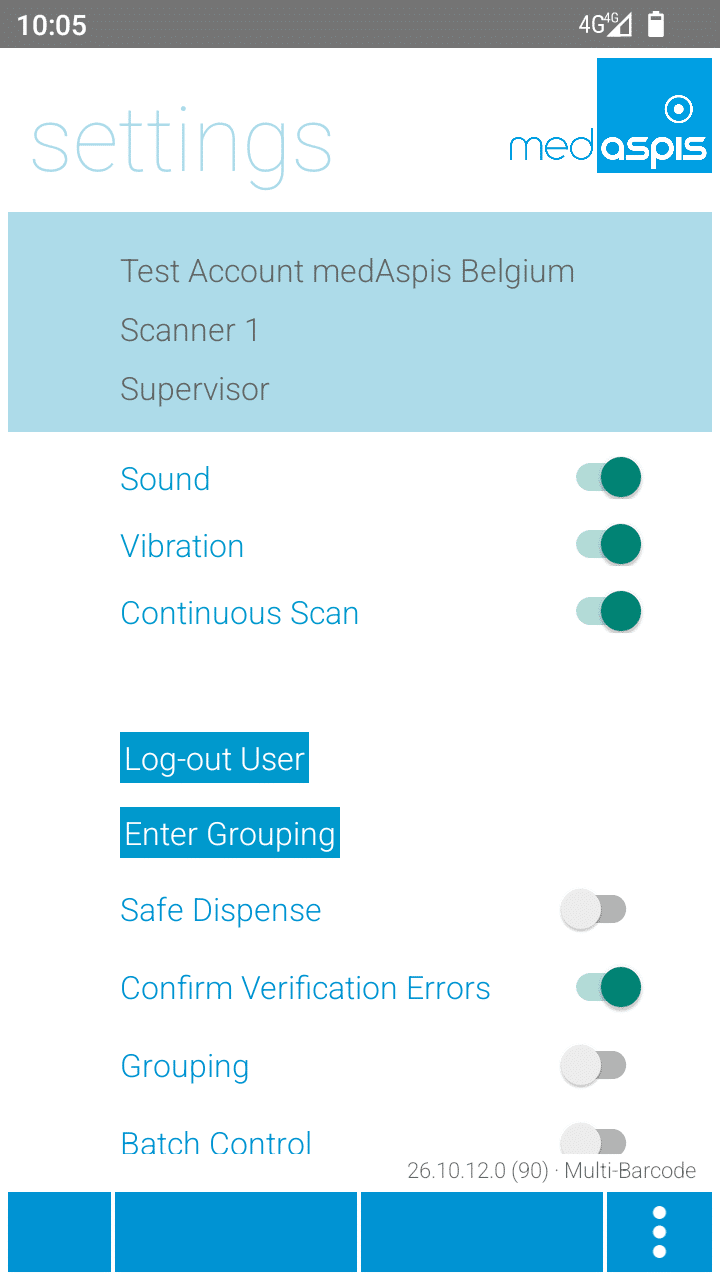
Various settings can be adjusted in the medAspis Connector+ app of the medAspis Speed Scanner.
The light blue box contains the connected customer account, the scanner profile, and the current operator of the medAspis Speed Scanner. The three switches below control the scanner unit.
Sound
enables sound playback during scanning
Vibration
enables vibration during scanning
Continuous Scan
In continuous mode, the scanner is permanently activated using the side buttons or the pistol grip. 2D matrix codes are continuously captured until the scanner is manually switched off again. If continuous mode is deactivated, 2D matrix codes can only be scanned individually.
Further setting options:
Log Out User
logs out the current operator. You must log in again for the next operation.
Enter Grouping
leads to the entry of a new grouping.
Secure decommissioning
allows secure decommissioning through automatically upstream verification.
Confirm Verification Errors
enables error messages during verification without disruptive confirmation
Grouping
activates the grouping function
Batch Control
activates automatic batch control.
The version number of the Connector+ app is specified in the lower section of the settings. Additionally, the term “Multi-Barcode” indicates whether the matrix scan function can be used on the device.
Please use a larger screen to view the full support menu.
Ordering new Aggregation Codes
Please allow up to 24 hours for your order to be processed. We will then send the newly generated Aggregation Codes as a PDF to the email address provided here.
Request a Replacement Device
Is your FMD Speed Scanner no longer working? To ensure you can continue working without interruption, we will send you a replacement device as quickly as possible. At the same time, you will receive a return label for sending back your defective device.
You will receive the replacement unit regardless of whether your warranty is still valid.
Terms of service
Customers can use the medAspis repair service if an FMD Speed Scanner supplied by medAspis is damaged. During the warranty period, we provide a replacement device free of charge.
The option of a free repair during the warranty period, as well as any other warranty rights, remains unaffected.
The medAspis replacement device service applies only to handheld devices purchased under a medAspis contract, regardless of the warranty period.
Support for counterfeit alerts
Do you suspect counterfeiting? Our medAspis Alert Team will assist you with the process. We are also happy to assist you with unclear error messages or unfamiliar situations.
Describe the incident using the report form. If needed, you can upload up to three photos. We will contact you as soon as possible and support you with the next steps.
Compliance Check-up:
FMD under review
Companies in the pharmaceutical industry are validated and meet strict quality requirements. Nevertheless, there is still a significant compliance risk with FMD.
Suspected falsification cases may not be handled and documented in a GxP-compliant manner.
With our free, anonymous and non-binding Compliance Check-up, we analyse and assess your company’s critical FMD error messages.
Review compliance
Based on your existing FMD audit trails, we analyse among other things:
How many falsification alerts were triggered, which types, and over what period?
What compliance risks exist?
How can your internal workflows be optimised?
The analysis is performed entirely within your data system. No data is transmitted to medAspis. All evaluations remain anonymous.
Request Compliance Check-up
Error messages
Download the error messages directly to your computer in your local language.
Can’t find your language? As soon as you become a customer, we’ll of course provide the error messages in your local language. Promise.
Systematic Validation
medAspis stands for proven quality and traceable processes. Lean FMD provides the necessary framework for this.
Validated and Documented
Lean FMD is validated in accordance with EU-GMP Annex 15. medAspis operates a Quality Management System in accordance with ISO 9001 and supports you with validation and the required documentation.
Validation toolkit
With the Validation Toolkit, you receive the documentation for the validation of Lean FMD. This enables you to carry out the necessary validation steps in a structured and traceable manner.
Download an excerpt from the Validation Toolkit to get a first impression of the structure and process of validation.
The complete toolkit contains all the necessary documents for validating Lean FMD.